Category: Uncategorized

  • Importing Ekahau maps into Central.

    While one might assume importing Ekahau surveys to be used as floor plans in Central would be straight forward. It does not appear to be the case. We were sold on the premise that you import your survey and Central auto-populates the map with your APs, and it does! As long as you follow a few steps.

    First of all in your Ekahau project. Whatever you name the project’s building will be the “Site” in Central.

    To save everyone the trouble, don’t bother importing it via Central’s “Add Floor” option. Go to ekahau.cloud, click the … next to the project and click “Project export via API”.
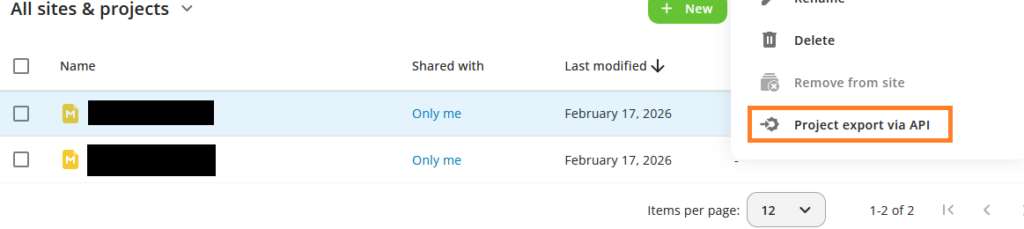

    It this point you will need to provide a token to proceed with the export. You can generate the token at the following location in Central.
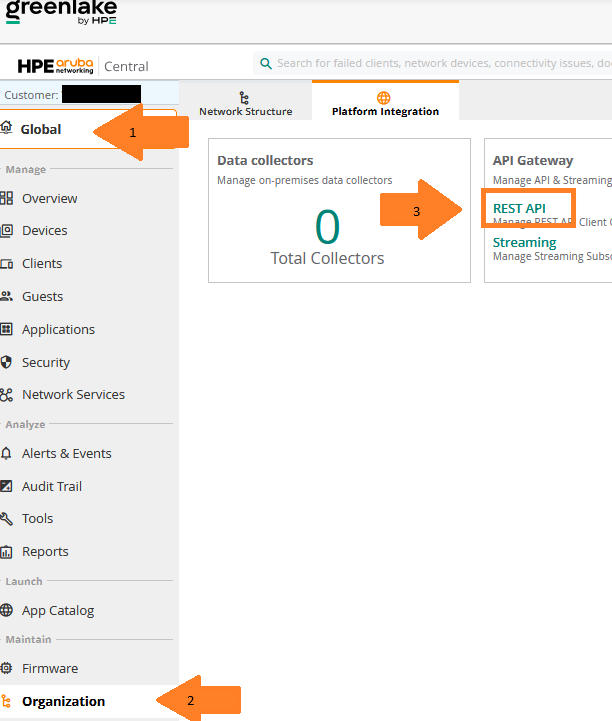

    Click on the My APPs & Tokens, followed by the + Add Apps & Tokens. This will generate your token as can be seen below. Click “Download Token”.

    On my browser this open up a window with a few lines of info. The one you need is the one I covered up in orange.
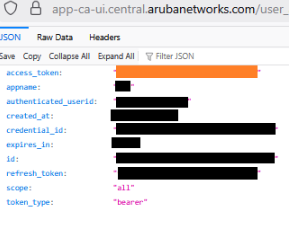
    Go back to ekahau.cloud and input that token and select the domain you belong to. If the export was successful, you receive an email from Ekahau Cloud indicating you have successfully exported “projectNameHere” to your Central.

    After a few minutes, it should appear in your Central under the Site that shares the name with your Ekahau Building name I previously mentionned.

    In Central you may or may not have to move the APs and switches over to that site for it to populate on the map.

    But it does work!

    Cheers,

    _
  • Ekahau SideKick 2

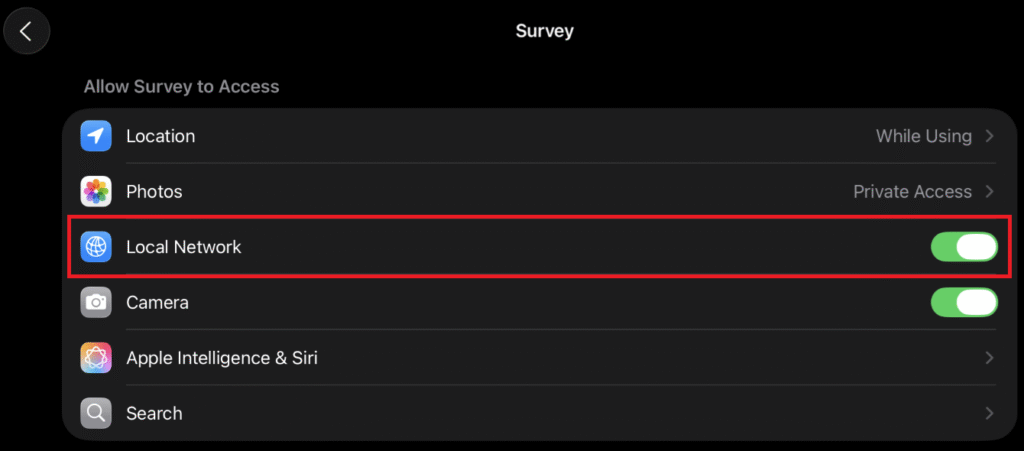
    We recently purchased a SideKick 2 and iPad Pro to make site surveying faster. I tested it at the office a few times with great success. Then, the worst thing happened, my iPad was updated to iOS 26 and Ekahau stopped working. I finally got around to troubleshooting the issue, and it appears that when you upgrade to iOS 26, “Local Network” is disabled for the Survey app.

    Settings>APPS>Survey, enable Local Network.

    After re-enabling it, everything worked perfectly and as intended.

  • Thinking outloud

    This is just meant to be blog for me to document our transition from Cisco to Aruba, and kind of like a working notebook and place for me to think out loud.

    We’ve very recently, in the span of 2 months, transitioned 80+ sites from being a Cisco/Dell network, wireless and wired respectively. 1300+ AP, and roughly 600 switches. While the transition has been done in record speed, tons of speed bumps have been hit at that same speed. From missed AP installs, misconfiguration of AP, lack of foresight on our MSPs behalf.

    The first complaints we got was how poor the coverage was compared to our previous 2702i APs. That was temporarily alleviated by increasing the radio output. By default the Aruba was broadcasting at around 8-12dbm. Previously (due to poor/sparse AP coverage)our Cisco APs were broadcasting between 16-22dbm. As such, we’ve increased to match what we previously had. Over the course of the year we will be deploying another 2000+ APs to our sites with the goal of removing 2.4Ghz altogether. But as we deploy the APs per school, we can lower the minimum and maximum dbm output.
